
COD Confirmation
A cash-on-delivery order nobody confirmed is a parcel that may come straight back to you. Wylto messages the customer as soon as the order is placed, asks them to confirm, and tags the order in Shopify with their answer.
Then it chases the ones who never reply — which is where most of the saved returns come from.
How it works
Section titled “How it works”- A COD order is placed. Wylto sends your template with quick-reply buttons.
- The customer taps a button. The first confirms, the second cancels.
- Wylto tags the Shopify order so you can filter on it in the admin.
- Nobody taps? A reminder goes out after the delay you set, and again after that if you want.
The buttons
Section titled “The buttons”Your template needs one or two quick-reply buttons, and they are read by position, not by label.
- First button — confirms the order
- Second button — cancels it
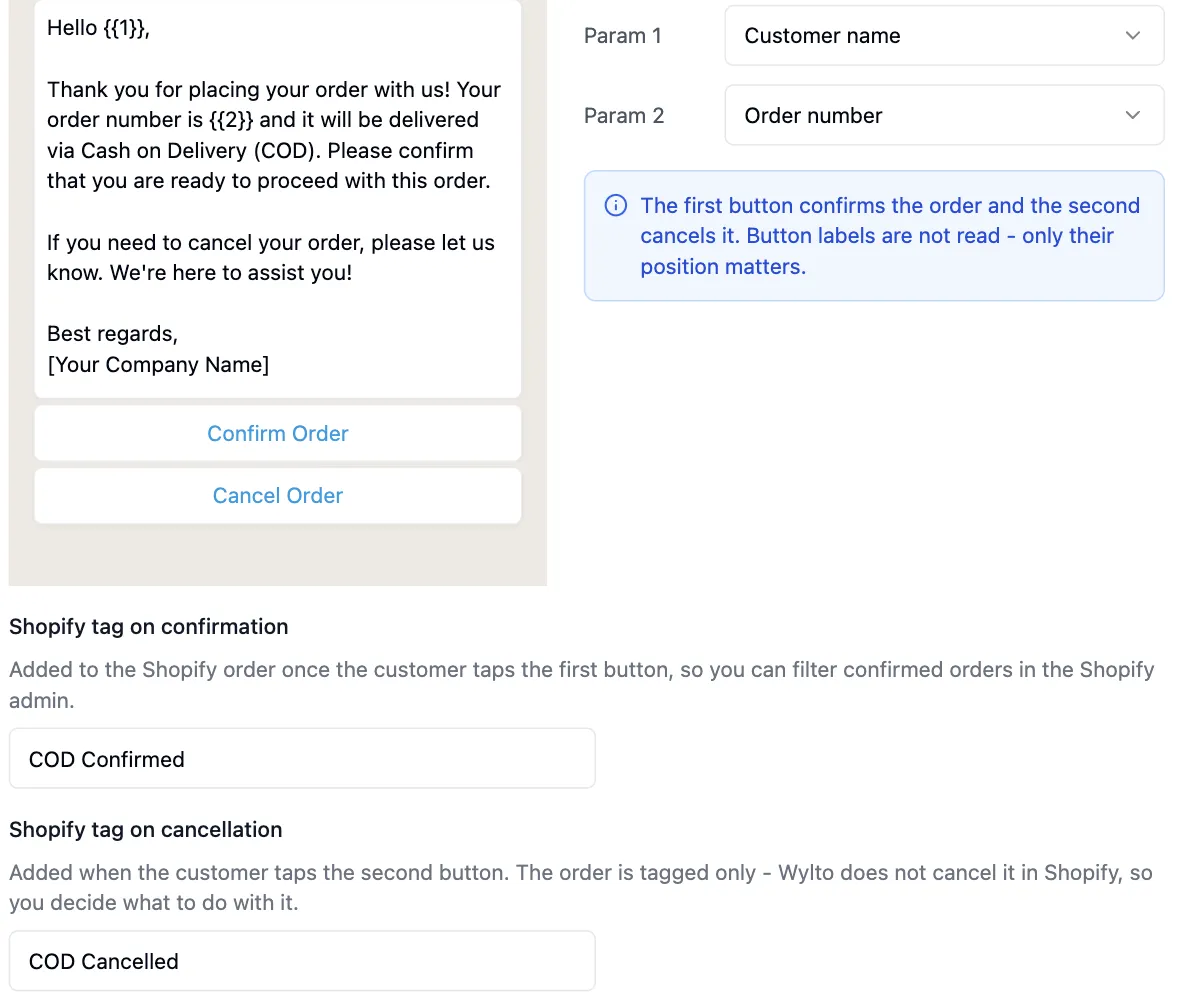
A template with no buttons cannot carry an answer back, and one with three or more has buttons Wylto cannot map — both are rejected when you save.
The Shopify tags
Section titled “The Shopify tags”| Field | When it is applied | Default |
|---|---|---|
| Shopify tag on confirmation | The customer taps the first button | COD Confirmed |
| Shopify tag on cancellation | The customer taps the second button | COD Cancelled |
The tag is added to the order’s existing tags — nothing is overwritten — and the order’s note is updated too.
Reminders
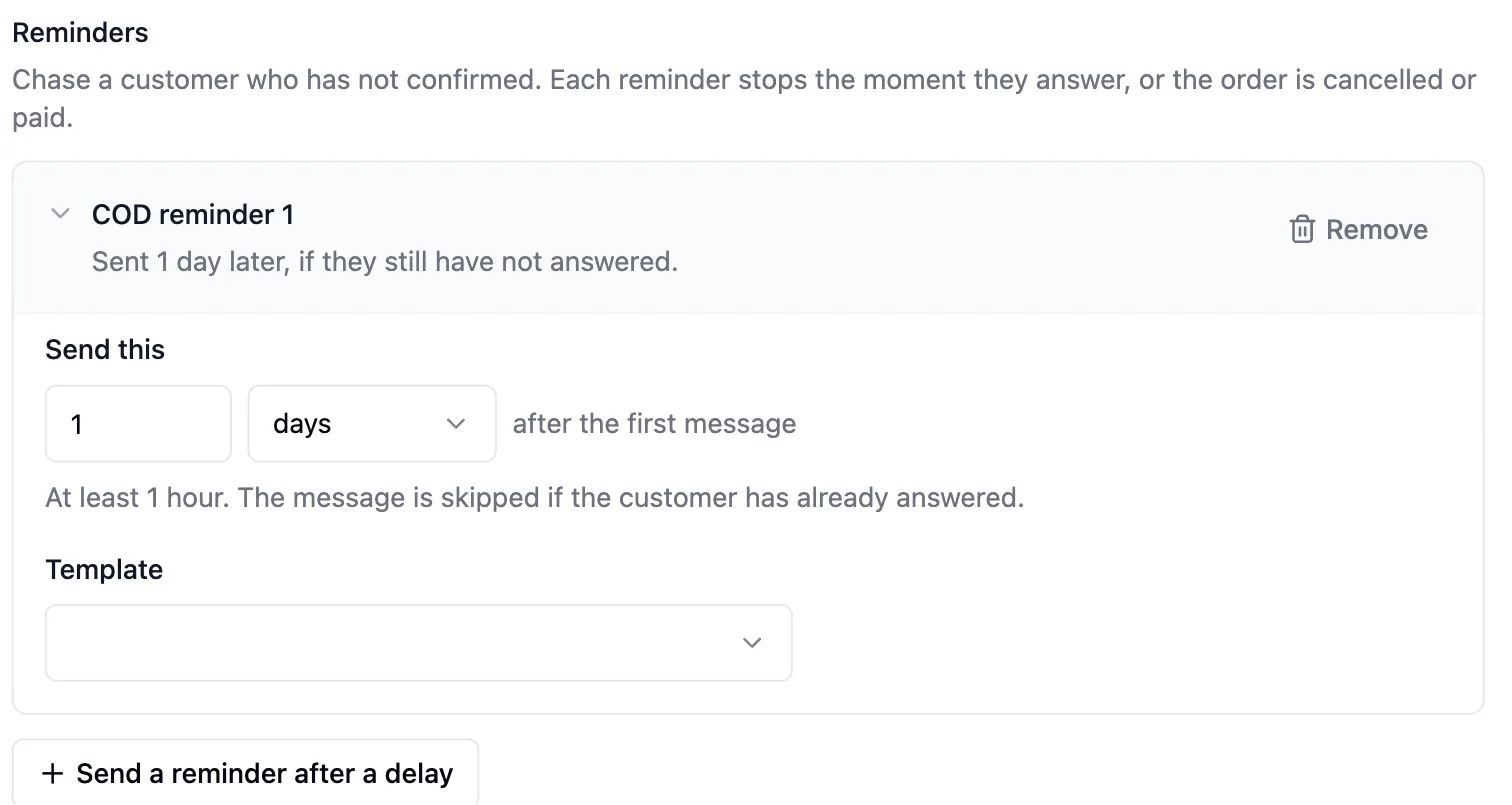
Section titled “Reminders”Most people never answer the first message. Reminders chase them.
-
Add a reminder
Section titled “Add a reminder”Click Send a reminder after a delay under the Reminders heading.
-
Set the delay
Section titled “Set the delay”Measured from the message before it. A day is a sensible first chase.
-
Pick a template
Section titled “Pick a template”A reminder carries the same confirm and cancel buttons as the first message, so it needs a template with one or two quick-reply buttons too. It does not get its own tags — the tags belong to the outcome, not to whichever message produced it.
Limits
Section titled “Limits”- At most 3 reminders. Past a few unanswered messages the order is not going to be confirmed.
- At least 1 hour between them. An hour is already aggressive for somebody who has just placed an order.
When a chase stops
Section titled “When a chase stops”Before each reminder, Wylto re-checks the order in Shopify. It stops when:
- The customer answered — the order already carries your confirmation or cancellation tag
- The order was cancelled
- The order was paid — it no longer needs confirming
- You removed the reminder, or turned COD confirmation off
Good to know
Section titled “Good to know”- Only orders whose payment gateway is cash on delivery trigger this.
- Each reminder counts separately in the metrics — COD reminder 1, COD reminder 2 — so you can see how many orders each one actually rescued.
- Combine with Payment received under Order Notifications to tell the customer when their COD order is marked paid.